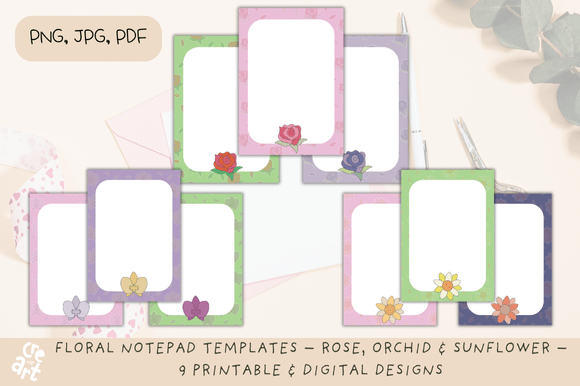
Floral Notepad Templates: Rose, Orchid & Sunflower for Print & Digital Design
There’s a reason floral motifs never go out of style. They bridge the gap between professionalism and personality, offering warmth that sterile grid layouts often lack. If you are a content creator, stationery designer, or planner enthusiast, you know the struggle of finding assets that look high-end without requiring advanced software skills to edit. This is exactly where a well-curated set of Floral Notepad Templates becomes an indispensable part of your design toolkit.
This collection isn't just about slapping a flower on a piece of paper. It is a versatile set of assets designed to solve specific workflow problems. You receive nine distinct designs anchored by three classic botanical subjects: the Rose, the Orchid, and the Sunflower. Each flower is rendered in three distinct color palettes—Pastel, Bright, and Vintage—giving you 27 unique visual combinations. This variety ensures that whether you are designing for a modern minimalist brand or a rustic cottagecore aesthetic, you have a template ready to go.
Visual Style and Aesthetic Versatility
The strength of these Floral Notepad Templates lies in their ability to adapt to different moods. The Orchid designs carry a sleek, modern elegance. They work beautifully for high-end brand mockups, luxury stationery, or wedding planning inserts. The Rose templates offer a softer, more romantic vibe, ideal for journaling, mood boards, or boutique gift wrap designs. Then there is the Sunflower, which brings an undeniable energy and cheerfulness—perfect for motivational planners, classroom resources, or summer marketing campaigns.
The color palettes are where the real design value shines. The Pastel options provide a low-contrast background that is easy on the eyes, making them excellent for digital planners where you will be typing over the graphics. The Bright palettes offer high saturation, allowing the floral elements to pop as central focal points in social media graphics or scrapbooking layouts. For those who prefer a more grounded, nostalgic feel, the Vintage palettes mimic the look of aged paper or retro botanical prints, adding instant character to any project.
Practical Applications for Designers and Entrepreneurs
As a creative professional, I look for assets that offer real-world value. These templates are not just static images; they are flexible design assets. Because they are provided in PNG format with transparent backgrounds, JPGs, and print-ready PDFs, they integrate seamlessly into almost any workflow.
For digital planner creators using apps like GoodNotes or Notability, the transparent PNGs are a game-changer. You can layer these floral elements over your existing digital notebooks to create seasonal covers or decorative stickers without worrying about white boxes obscuring your background. This level of integration is crucial for maintaining a polished, professional look in the digital planning space.
If you run a small business or manage social media graphics, these templates allow you to create cohesive content quickly. Imagine using the Bright Sunflower template for your Monday motivation posts and the Pastel Rose template for your weekend reflections. This consistency helps build brand identity without the need to hire a graphic designer for every single post. The templates serve as a strong foundation that you can customize with your own typography—pairing them with a clean sans serif font for modern appeal or a handwritten script font for a personal touch.
Integrating Templates into Your Brand Identity
Consistency is the cornerstone of brand perception. When your audience sees your materials, they should immediately recognize the visual language. By utilizing the Floral Notepad Templates, you can establish a recurring visual motif across different platforms.
For instance, if you are a wellness blogger, you might use the Orchid designs for your e-book covers and the matching Rose designs for your weekly newsletter headers. This creates a subliminal connection for your readers. It signals that your content is curated, organized, and visually appealing. It moves your brand from "just another blog" to a recognized publication with a distinct aesthetic.
Furthermore, these templates are perfect for packaging design for small-batch products. If you sell candles, soaps, or baked goods, printing the PDF versions on sticker paper can transform plain jars into boutique products. The "Vintage" palette, in particular, works exceptionally well for artisanal goods, lending an air of established quality and craftsmanship.
Choosing the Right Template for Your Project
Selecting the right template involves more than just picking your favorite flower. You need to consider the readability and hierarchy of your final product. If you are creating a document that is heavy on text—like a contract or a long-form article—opt for the Pastel palettes. The lower contrast ensures that black or dark grey text remains legible against the floral background.
Conversely, if you are designing a cover page, a poster, or a flyer where the graphics are the main event, the Bright or Vintage palettes are superior choices. They create a stronger emotional impact and draw the eye immediately.
When evaluating the fit for your project, think about your audience. A corporate client might appreciate the sophistication of the Orchid, while a lifestyle brand targeting young families might connect better with the playful Sunflower. The versatility of this set allows you to pivot between these audiences simply by swapping out the background graphic.
Technical Details and Workflow Optimization
Efficiency is key in a fast-paced creative environment. The inclusion of multiple file formats in this collection ensures you aren't wasting time converting files or removing backgrounds manually.
- PNG Files: Essential for layering. Use these in Photoshop, Canva, or Procreate to build complex compositions without background conflicts.
- JPG Files: Best for quick uploads where file size matters, such as web backgrounds or rapid social media posts.
- PDF Files: The standard for printing. These ensure your colors remain accurate and your lines stay crisp when transferred to physical paper.
This multi-format approach supports a hybrid workflow. You might design a planner insert digitally on your iPad, then switch to printing the PDF version for a client meeting. Having access to the same design in all these formats ensures your output is consistent whether it is on a screen or in hand.
Ultimately, these Floral Notepad Templates